Introduction
When people talk about improving business operations with AI, a common first move is to ask, "Which tasks can we replace with AI?"
That instinct is understandable. There is value in identifying work that AI might handle. But if you start there, the main question can quietly shift from "What would meaningfully improve this workflow?" to "What looks AI-compatible?" Once that happens, it becomes easier to optimize for what AI can do in isolation rather than what makes sense for the business process as a whole.
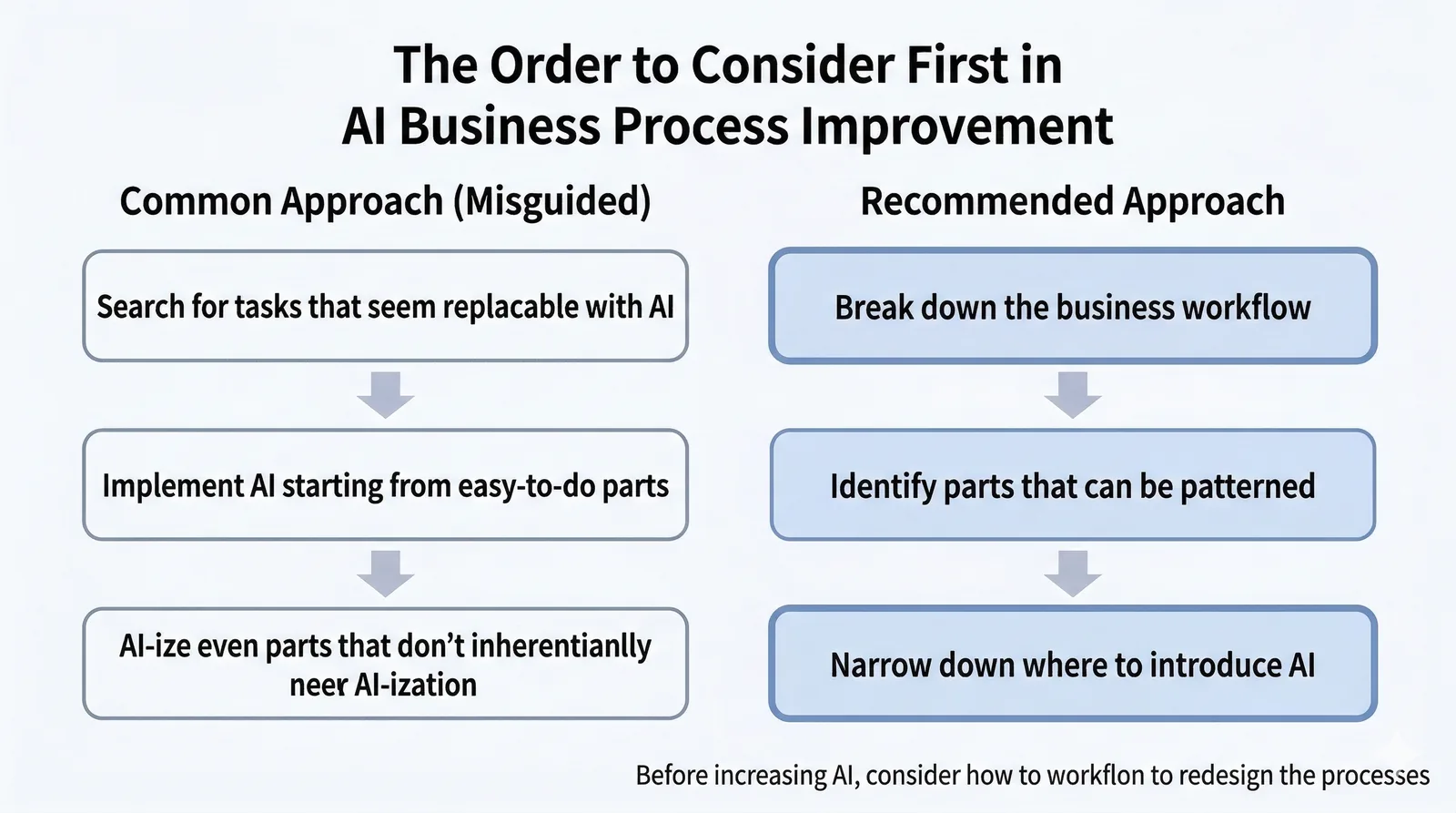
My own view is that the important question in AI-driven process improvement is not how much AI ends up inside the finished workflow. It is whether you first break the workflow down, redesign as much of it as possible in a deterministic way, and then use AI only where the work truly resists patterning.
That does not mean AI should be avoided. In fact, AI can be extremely useful when you are analyzing, designing, and building the process itself. What matters is not simply whether you use AI, but where you use it.
In this article, I want to lay out a practical way to think about AI-driven business improvement: where to start, how to separate work that should be deterministic from work that cannot be fully patterned, and how to decide where AI actually belongs. I will also use examples such as internal inquiry routing and access request handling to make the idea concrete.
What This Article Covers
- The first lens to use when thinking about AI-driven process improvement
- How to decide where AI should and should not sit in a live workflow
- Concrete examples of how to redesign a workflow around AI without forcing AI into everything
1. Why starting from "what AI can do" often leads you off track
If you are asked to improve a business process with AI, it is natural to start thinking, "This task looks like something AI could replace." With today’s generative AI tools, that kind of thinking is even more tempting.
But there is an important distinction here. AI can probably do this is not the same as this is a good way to improve the workflow.
Even if a task looks replaceable in isolation, that does not mean it should be handed over to AI in production. Once you look at the upstream and downstream steps, exception handling, ownership boundaries, and the stability the process actually needs, the picture often changes. If you let AI absorb parts that could have been made rule-based, the overall system can become less stable rather than more useful.
In other words, the common mistake is to focus on which tasks can be replaced with AI before asking how the business process itself should be improved. That is why I think the first step should be to look at the workflow as a whole, not at an isolated task.
2. Start by breaking down the workflow
When I think about AI-driven business improvement, the first thing I do is break the workflow down. I try not to jump straight into tools or implementation. Instead, I first ask what steps the process is actually made of.
At a minimum, I want to look at questions like these:
- What is the input?
- What is the output?
- What rules are used to make decisions?
- What kinds of exceptions appear?
- Where is the effort actually going?
Looking at inputs and outputs helps clarify how each step connects to the steps around it. Looking at decision rules helps reveal which parts can be formalized and which parts are still fuzzy. Looking at exceptions helps you see where AI may actually be useful and where a human should remain involved. Looking at effort helps you decide whether a step is even worth optimizing in the first place.
At this stage, you do not need to decide where AI will go. The point is simply to make the workflow visible and understand what kinds of processing are happening in each part of it.
3. Separate work that can be patterned from work that cannot
Once you break a workflow down, you often find that some parts should behave the same way every time, while other parts still require interpretation, ambiguity handling, or contextual judgment.
For example, routing a request to a predefined owner based on explicit conditions is usually fairly easy to pattern. Reading a free-form message, filling in missing intent, or interpreting ambiguous wording is much harder to reduce to fixed rules.
In this article, I will refer to the first type as deterministic and the second as non-deterministic. A deterministic step is one where the same input should generally lead to the same result. A non-deterministic step is one where the input is ambiguous, contextual, or difficult to fully formalize.
This distinction matters because stable parts of a workflow should be pushed toward deterministic handling whenever possible. Only after making that separation does it become clear where AI actually belongs.
If you skip this step and insert AI too early, even parts of the workflow that should behave consistently can end up depending on fuzzy interpretation. The issue is not that AI is inherently bad. The issue is that the placement is wrong for the kind of stability the process needs.
4. Where AI should actually be used
The point here is not that AI should be avoided. In fact, AI can be used quite broadly when you are designing the system.
For example, AI can be very useful for organizing historical data, proposing categories, drafting required input fields, outlining rules, and accelerating workflow implementation. At that stage, the cost of trial and error is relatively low, and AI’s speed and idea generation can be genuinely helpful.
What I do not think is necessary is forcing AI into the center of the finished production workflow. If AI helps you rethink the process and redesign it so that the live workflow becomes more rule-based and stable, that is still absolutely AI-driven business improvement. I do not think the final system needs to visibly contain lots of AI in order for the effort to count.
In production, AI should usually be reserved for the parts that really resist patterning: exception handling, free-text interpretation, or cases where context is inherently hard to formalize. In that sense, the key question is not how much AI can we add? but where should AI remain?
Put differently, AI can be used broadly to build the system, but only minimally to run it.
5. Example: Internal inquiry intake and routing
Take a common operational workflow: people submit internal inquiries through Slack or email, and someone has to read the message and route it to the right owner.
The most obvious AI-first design is to have AI read the inquiry text, classify it, assign a priority, and route it to the right team. Technically, that sounds very plausible. It is also easy to imagine as a demo.
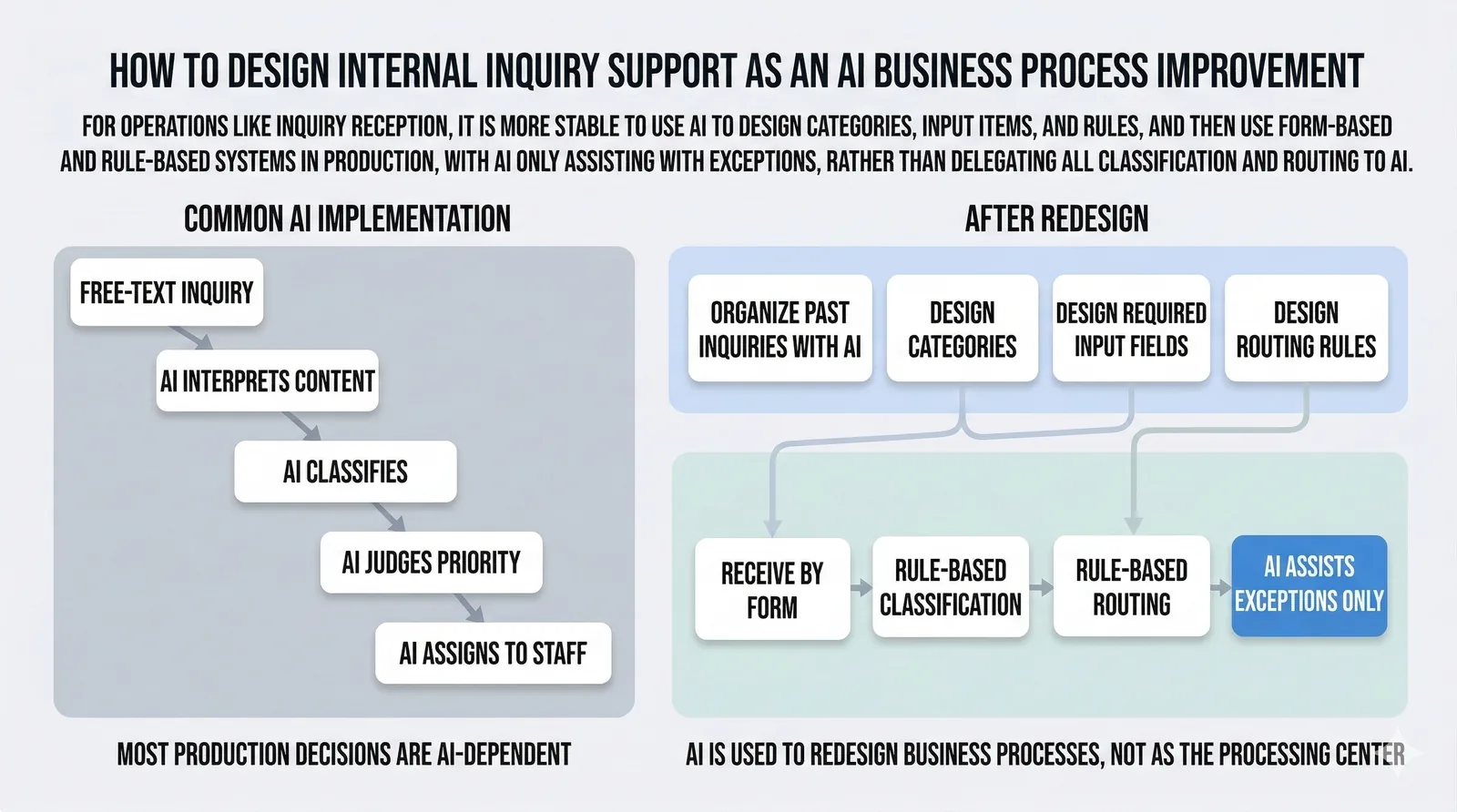
But as a production workflow, this mixes together several different kinds of processing. So instead of starting from the AI layer, I would first break the work down into something like intake -> content normalization -> classification -> routing -> response.
When you analyze past inquiries with AI, you can often extract a large amount of structure in advance: common categories, required input fields, and routing rules for different cases. For example, if you standardize fields such as inquiry type, target system, urgency, and required attachments, much of the routing logic can be made routine. In other words, you do not necessarily need AI to re-interpret everything from scratch every time.
From that perspective, a more stable end state is usually something like: improve the intake form, make key fields structured, and route based on rules by category. If AI remains in the loop, it can focus on helping interpret free text or handling cases that fall outside the rules.
The key shift is from letting AI handle inquiries to using AI to redesign the inquiry workflow. AI does not need to sit at the center of the final process. In many cases, it is more valuable as a strong design aid than as the core production decision-maker.
6. A second example: Access request handling
The same logic applies even more strongly to workflows where precision and reproducibility matter a lot, such as access request handling.
Here too, it is easy to imagine a design where AI reads the request text, decides which permissions are needed, and even determines the approval route dynamically. On the surface, that can look convenient. But in this kind of workflow, inconsistency quickly turns into permission mistakes or governance risk.
That is why I think AI is often more valuable in the design phase here as well: organizing request patterns, helping create a permissions mapping table, and surfacing edge cases. The finished workflow can then operate deterministically against that mapping, with only genuinely ambiguous requests treated as exceptions.
Whether the workflow is inquiry routing or access request handling, the underlying principle is the same. The more a process demands precision and repeatability, the more likely it is that the finished system should lean deterministic.
7. Three ways to think about AI-driven business improvement
If I compress the whole article into a simple working lens, it comes down to these three steps.
7-1. Break the workflow down
Do not look only at a single task. Look at the workflow end to end, including the steps around it. Once you can see what each step receives and produces, the real optimization targets become much clearer.
7-2. Ask whether it can be patterned
For each step, clarify the inputs, outputs, decision rules, and exceptions. Then identify which parts can be pushed toward deterministic handling. If a step should behave the same way every time, rules or structure often make more sense than AI.
7-3. Narrow where AI belongs
Use AI broadly for analysis, design, and implementation. In the live workflow, keep it only where the work truly cannot be fully patterned. The goal is not to maximize AI. It is to place it where it actually makes sense.
Conclusion
What matters in AI-driven business improvement is not adding more AI into the workflow. It is redesigning the workflow with AI in mind.
That means first breaking the process down, then identifying which parts can be handled deterministically and which parts truly need non-deterministic handling. Searching for tasks that look replaceable by AI can come later.
AI can be used very broadly while you are designing and building the system. But in the finished production workflow, it is often enough to keep AI only where it is genuinely needed. In practice, I think it is more useful to start from How should this workflow be redesigned with AI in mind? than from What can AI replace here?
This article focuses on how to rethink individual workflows. If you want the organizational side of the story, including how to launch AI adoption, make it easy to try, and connect that to continued use, see Internal AI Adoption Does Not Move Forward with Training Alone.